
How to set it up in Glide
- Connect the Dexcom G6: in Glide, tap Connect a CGM and enter the wearer's own Dexcom login. Full setup.
- On your phone, go to Settings → Notifications, turn on Signal lost and set No reading for (30 minutes by default, 15 to 120).
- Everyone in the family who wants the alert does the same in their own Glide.
- For the night: Settings → Phone Alerts → Add a phone number. Enter a mobile number (outside the US, with its country code) and the code Glide texts you.
- Under Wake-up call, set the hours (10 PM to 8 AM by default). Under When to call, keep Call on signal loss on.
- Tap Add caller to Contacts. In Contacts, open that contact, tap Edit → Ringtone and turn on Emergency Bypass, so the call rings through Silent and Focus.
- Tap Send a test call.
What you see
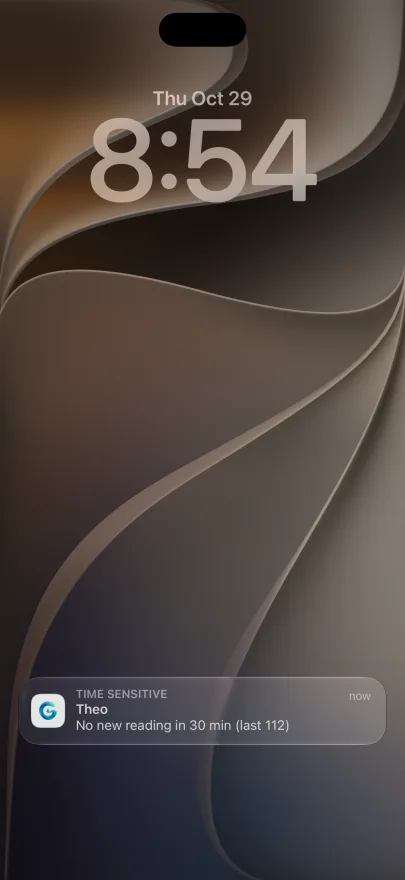
- A lost signal alert on each phone where it is turned on.
- At night, a real phone call from Glide Alarm. Glide's server places it, so the app does not have to be open.
- Another call every 15 minutes by default (the Snooze setting), until readings come back.
- The chart fills in when the sensor reconnects.
Questions
What does Dexcom say to do?
Signal Loss means the phone or receiver is not getting readings from the G6 transmitter, usually because of distance (more than 20 feet), a body, wall or water in between, or phone settings. Missed readings (up to 3 hours) can fill in after it reconnects. (Dexcom; Dexcom user guide, p. 147)
- Use your meter for treatment decisions until readings return.
- Keep the transmitter and phone within 20 feet of each other and wait 30 minutes.
- Bring the G6 app to the foreground and do not swipe it closed.
- Turn Bluetooth off and on, then wait 10 minutes.
- Restart the phone, reopen the G6 app, and wait 10 minutes.
- Keep the phone charged, because Low Power Mode turns off Bluetooth.
Is the Dexcom Share server down?
When Glide and Dexcom Follow both stop at once, check the Dexcom Share live status.
What does Glide cost?
Glide is free: readings, the chart, followers, alerts, the nighttime call, the report and the Apple Watch app. Glide Premium ($4.99 a month or $39.99 a year, two weeks free) adds photo carb counting and My Lab's food groups.
More with Glide
Dexcom G6 with Glide
- Apple Watch
- Widgets & Lock Screen
- Report for the doctor
- Alarms in Silent mode
- How many followers
- Signal loss alert for followers
- Follower app not updating
- Alarms not sounding
- Follower not getting alerts
Signal loss on another CGM
Sources, quoted
- Dexcom: “Your display device may be too far from your transmitter or there may be something, such as a wall or water, between your transmitter and your display device.”
- Dexcom: “Bring the running G6 app to the foreground. Do not swipe kill your app; it is intended to run at all times”
- Dexcom: “If that doesn't work, turn Bluetooth off and on. Wait 10 minutes.”
- Dexcom: “If that doesn't work, restart the smart device, unlock the main display and reopen the Dexcom G6 app. Wait 10 minutes.”
- Dexcom: “Make sure your phone is charging/charged. Low power mode on smartphones will turn off Bluetooth.”
- Dexcom: “During signal loss, use your meter to check your glucose levels and make any treatment decisions.”
- Dexcom user guide, p. 147: “Keep your transmitter and display device within 20 feet of each other. Wait 30 minutes.”
- Dexcom user guide, p. 147: “When the display device and transmitter connect after a signal loss or similar issue, up to 3 hours of missed G6 readings can fill in on the graph.”
Every quote is checked against its source page before each update of this site; last checked 2026-10-06. Makers change their apps; the source page is the authority when it differs.