How to set it up in Glide
- Connect the Dexcom G6: in Glide, tap Connect a CGM and enter the wearer's own Dexcom login. Full setup.
- Home Screen: touch and hold an empty area, tap Edit and Add Widget, then search for Glide.
- Lock Screen: touch and hold it, tap Customize and choose the Lock Screen. Tap the area below the time for the round widget, or the date above the time for the one-line widget, then choose Glide.
- Live Activity: in Glide Settings, under Live Activity & Widgets, turn on Show Live Activity.
- Invite the family: Settings → Followers → Invite a follower. Each person installs Glide, taps Watch someone else's glucose, enters the code and taps Join.
What you see
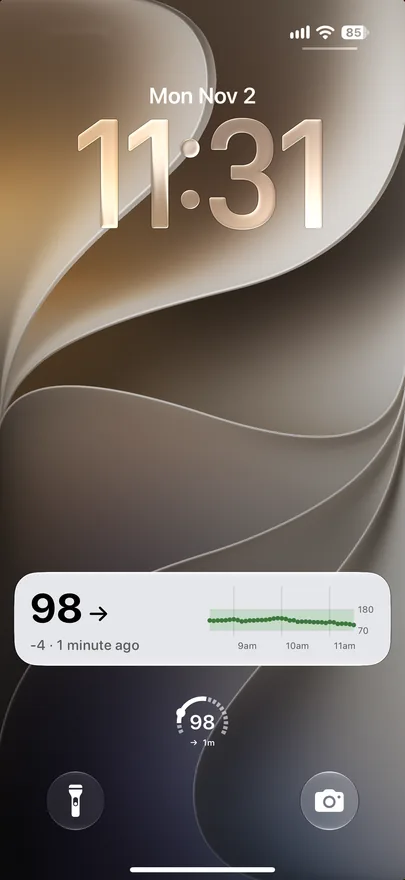
- The widgets: the reading, its trend and how old it is. The Home Screen widget adds the change per 5 minutes and the last 3 hours. iOS decides when a widget refreshes, so it can be older than the reading in Glide, and it shows “no data” once the reading is an hour old.
- The Live Activity: the reading, the arrow, the change per 5 minutes and the minutes since the reading.
- The last 3 hours as a line, and the same reading in the Dynamic Island.
- iOS ends a Live Activity after 8 hours. Opening Glide starts a new one.
Questions
Does the Dexcom G6 app have an iPhone widget?
Yes. The G6 app has a Today View widget. The G6 user guide also describes a Follow home screen widget (iOS 14 or later) for followers. Dexcom does not mention a Live Activity for G6. (App Store listing; Dexcom user guide, p. 203)
What does Glide cost?
Glide is free: readings, the chart, followers, alerts, the nighttime call, the report and the Apple Watch app. Glide Premium ($4.99 a month or $39.99 a year, two weeks free) adds photo carb counting and My Lab's food groups.
More with Glide
Dexcom G6 with Glide
- Apple Watch
- Report for the doctor
- Alarms in Silent mode
- How many followers
- Signal loss alert for followers
- Signal loss
- Follower app not updating
- Alarms not sounding
- Follower not getting alerts
Widgets & Lock Screen on another CGM
Sources, quoted
- App Store listing: “Today View widget allows you to view your glucose data on the lock screen of your smart device”
- Dexcom user guide, p. 203: “Check your Sharer’s reading, trend arrow, and graph with a widget on your home screen.”
Every quote is checked against its source page before each update of this site; last checked 2026-10-06. Makers change their apps; the source page is the authority when it differs.