
How to set it up in Glide
- Connect the Dexcom G6: in Glide, tap Connect a CGM and enter the wearer's own Dexcom login. Full setup.
- On Home, tap Insights.
- Pick the period: 3 to 180 days (30 by default).
- Tap Share report as PDF and send it by email, Messages or AirDrop.
What you see
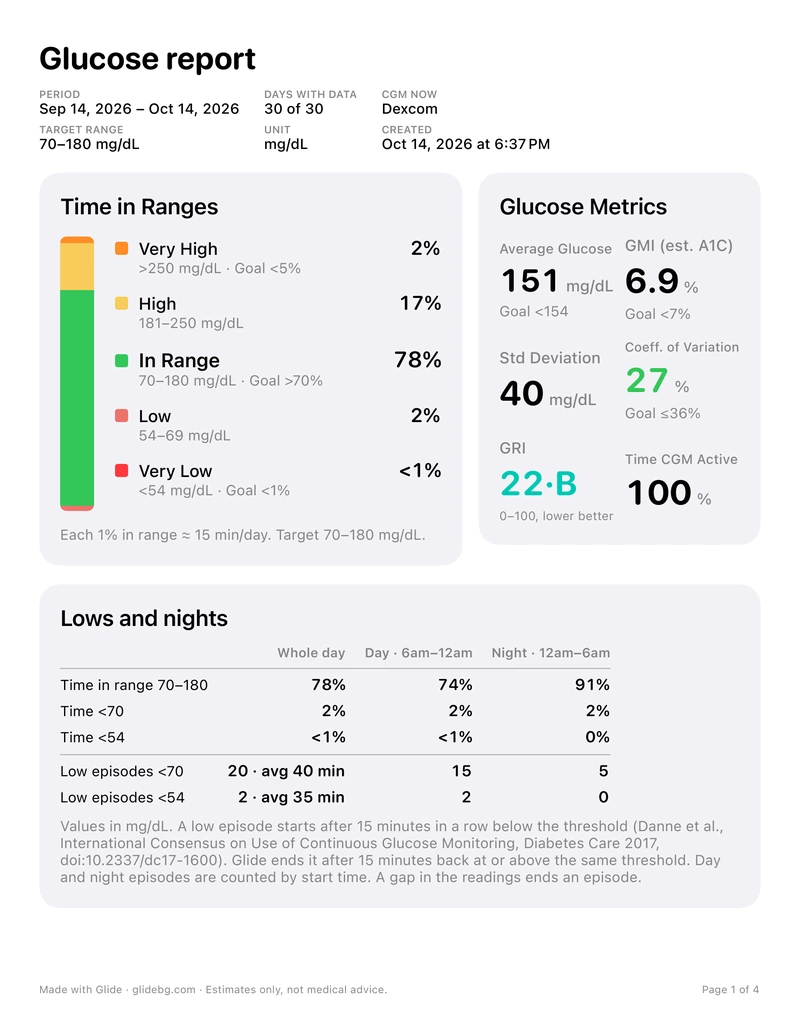
- Page 1: time in ranges, the metrics, and lows and nights.
- Page 2: the 24-hour profile and the time in range trend.
- A daily view for each day of the period.
- The period, the days with data, the CGM and the target range at the top.
Questions
How does the Dexcom G6 app share data with the doctor?
Yes. Dexcom Clarity lets a clinic see your data with a sharing code. The Clarity app makes PDF reports for 2 to 90 days, and Clarity can export raw data as CSV. (Dexcom)
What does Glide cost?
Glide is free: readings, the chart, followers, alerts, the nighttime call, the report and the Apple Watch app. Glide Premium ($4.99 a month or $39.99 a year, two weeks free) adds photo carb counting and My Lab's food groups.
More with Glide
Dexcom G6 with Glide
- Apple Watch
- Widgets & Lock Screen
- Alarms in Silent mode
- How many followers
- Signal loss alert for followers
- Signal loss
- Follower app not updating
- Alarms not sounding
- Follower not getting alerts
Report for the doctor on another CGM
Sources, quoted
- Dexcom: “Your clinic uses their Dexcom Clarity clinic account to invite you to share data with them.”
- Dexcom: “Dexcom Clarity app generates PDF reports for 2, 7, 14, 30, or 90 days.”
- Dexcom: “Dexcom Clarity has the option to export data as a CSV file viewable in Excel”
Every quote is checked against its source page before each update of this site; last checked 2026-10-06. Makers change their apps; the source page is the authority when it differs.