How to set it up in Glide
- Connect the Libre 2: in Glide, tap Connect a CGM and enter a LibreLinkUp follower login. Full setup.
- Invite the family: Settings → Followers → Invite a follower. Each person installs Glide, taps Watch someone else's glucose, enters the code and taps Join.
- Open Glide on the watch. It signs in from the iPhone, so there is no login on the wrist.
- Add a complication: touch and hold the watch face, tap Edit, and pick Glide.
What you see
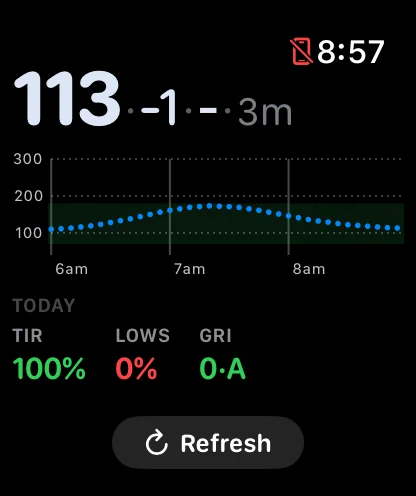
- The number, the change per 5 minutes, the arrow and the minutes since the reading.
- The last 3 hours as a chart, and today's time in range, lows and GRI.
- A round complication whose ring empties as the reading ages, so an old number never looks new.
- Glide's alerts on the watch, like any iPhone notification.
Questions
Does the Libre 2 app work on Apple Watch?
Yes. The Libre app has a companion Apple Watch app that shows the reading, trend arrow and graph, and mirrors alarms from the phone. It needs Apple Watch Series 4 or later and does not support Android watches. LibreLinkUp is an iPhone-only app; its notifications can mirror to a paired watch. (Abbott; App Store listing)
How often does the complication update?
watchOS decides. Glide asks for every 10 minutes, and opening the watch app fetches the newest reading at once.
What does Glide cost?
Glide is free: readings, the chart, followers, alerts, the nighttime call, the report and the Apple Watch app. Glide Premium ($4.99 a month or $39.99 a year, two weeks free) adds photo carb counting and My Lab's food groups.
More with Glide
Libre 2 with Glide
- Widgets & Lock Screen
- Report for the doctor
- Alarms in Silent mode
- How many followers
- Signal loss alert for followers
- Signal loss
- Follower app not updating
- Alarms not sounding
- Follower not getting alerts
Apple Watch on another CGM
Sources, quoted
- Abbott: “If you have an Apple Watch, you can keep an eye on your Sensor readings through Libre app’s companion watch app.”
- App Store listing: “Only for iPhone”
- Abbott: “Currently available only for Apple Watch.”
- Abbott: “This release does not support Android watches.”
- Abbott: “Apple Watch Series 7: WatchOS 8.3”
Every quote is checked against its source page before each update of this site; last checked 2026-10-06. Makers change their apps; the source page is the authority when it differs.
In the US, Abbott's Libre app replaces the FreeStyle Libre 2 app for new sensors. LibreLinkUp alert settings for Libre 2 differ by the country of the wearer's LibreView account: the US list has no No Recent Data alert.